Getting paid is the easy part

Where the work
meets the money.

QuixChex runs the whole job — your customers, the schedule, the crew, the estimates, the invoices, the payments and the books. All on one customer record, from the first quote to the money in your account.

Let's see what Quix can do for you.

Second Nature Integrations

iStream Winston POS Global Payments Datacap Cash App Chime Varo Platinum Relations
app.quixchex.com/dashboard
Money in
$48,290
12%
Outstanding
$3,140
Next payout
$9,875
Collected last 10 weeks
DJ · Elm St MR · Route 9 2 estimates due
Transactions this cycle341 of 500
New Schedule
Refund
New Job
New Customer
“Bill the Tuesday mow route” Ask Quix
1 login Customers, crews, invoices and payments in one place
Live map See your crew while they're on the clock, not after
ACH + card Both on the same schedule, and failed payments retry themselves
24/7 Support from actual people, not a chatbot

Meet Quix

One Platform, Everything Handled

A scheduler here, an invoicing tool there, a spreadsheet for the crew, and none of them talking to each other. Here it's one system, running off one customer list — nine jobs that used to need nine logins.

Your customer book

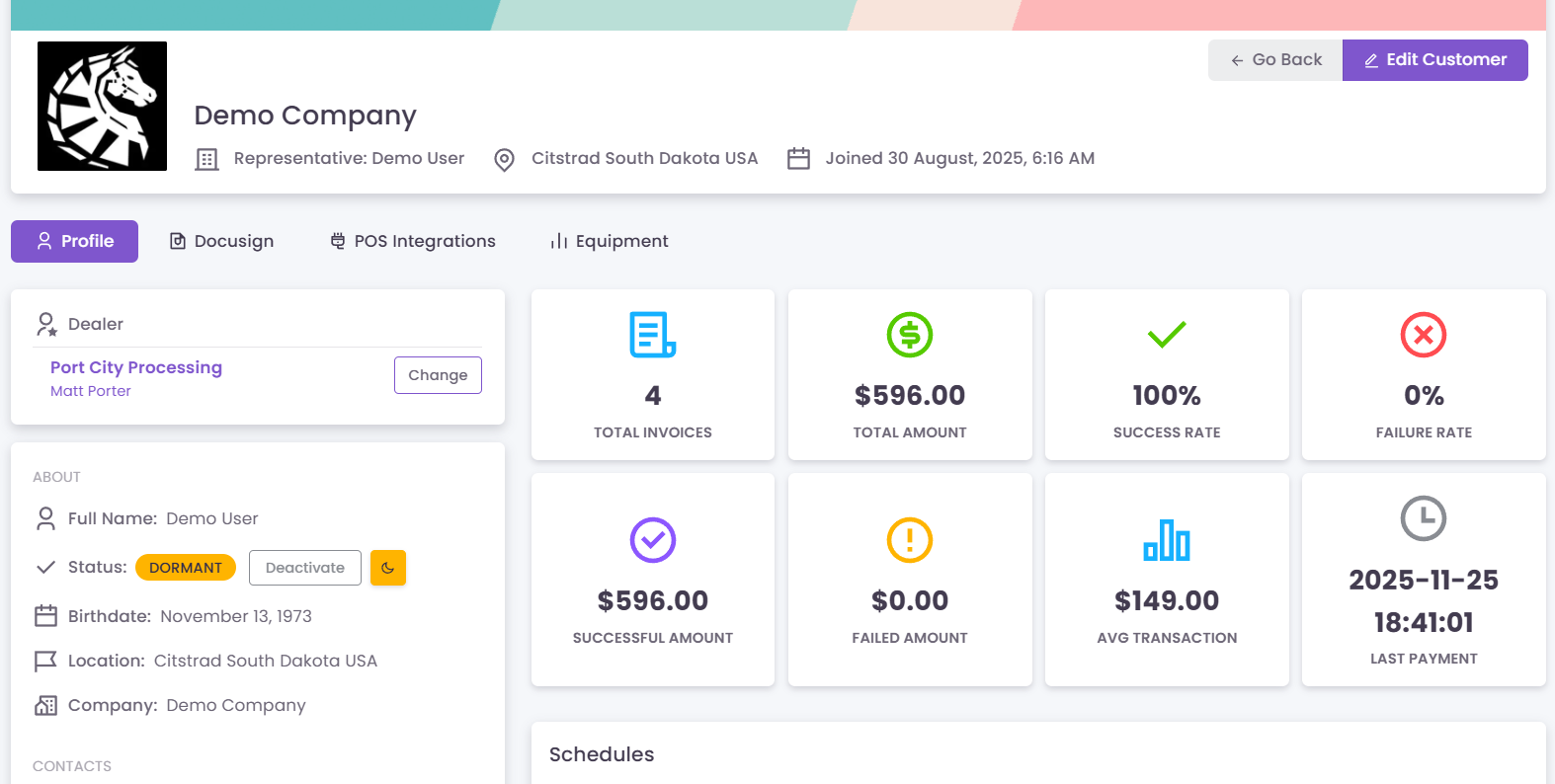
Every customer, what they're on, what they've paid and what they owe — in one record instead of four places.

  • Upload a spreadsheet to get started
  • Payment methods stored against the customer
  • Full history: jobs, charges, refunds, notes
  • Contacts, addresses and equipment on file

Customers get their own login

Send them a link and they're in — no password to forget. They see their schedule, their history and their receipts without ringing you.

  • One-click magic link, nothing to set up
  • They can see what's booked and what they paid
  • Service requests come to you in writing
  • Fewer "what did I pay you in March?" calls

Scheduling and appointments

Tap an icon for quick service work. Type real line items when you're building a draw schedule on a big job.

  • Bookings with reminders that go out on their own
  • One-off, recurring, or milestone by milestone
  • Assign the work to a specific person
  • Route work by day instead of by memory

Your operation on a live map

Know who's on the clock, where they are and how each job is going — without ringing round to find out.

  • Clock in and out from a phone
  • GPS runs only while they're on the clock
  • Photos and notes sent from the driveway
  • Hours captured for payroll, not guessed

Estimates, quotes and jobs

Someone goes and looks, sends back what they found, you put a price on it. Approved work becomes a booked job.

  • Estimates for people who aren't customers yet
  • Photos, video and measurements from site
  • Quote out, approval back, job on the calendar
  • Every stage colour-coded so nothing stalls

Billing that runs itself

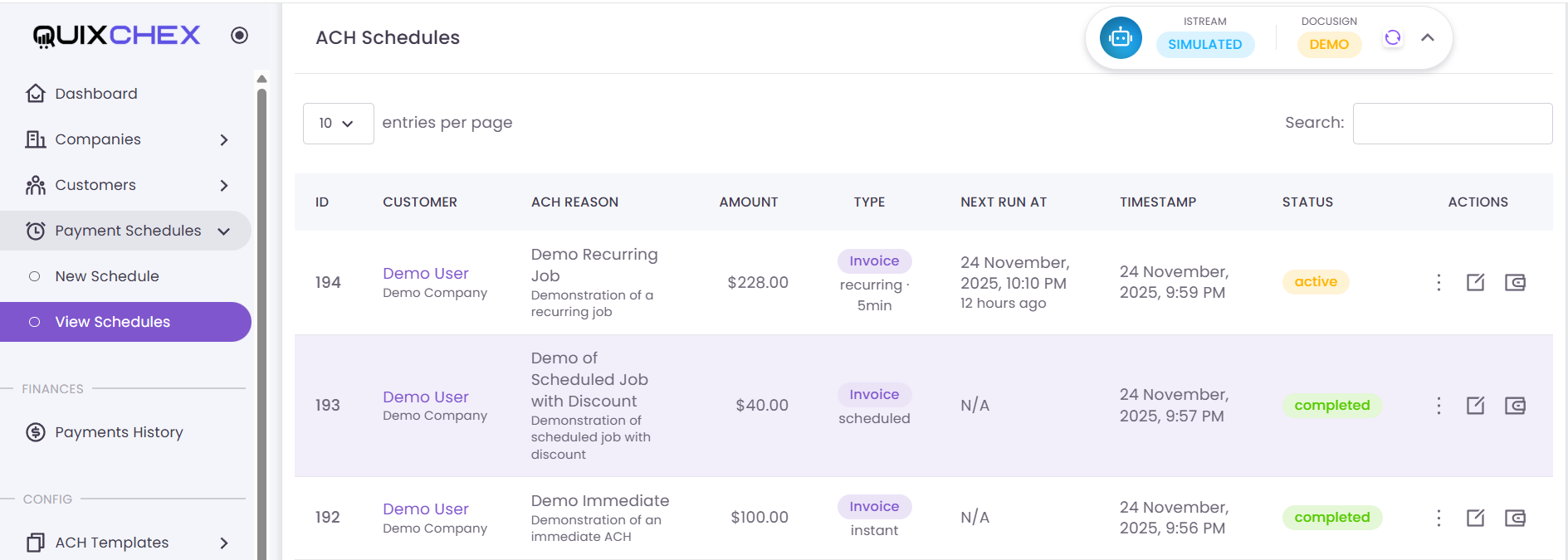
Set up the weekly mow or the monthly contract once. After that it charges on its own and you watch the money land.

  • Weekly, monthly, quarterly or per milestone
  • Failed payments retry automatically
  • Refund in two clicks, every step logged
  • Change a price once, everyone picks it up

Payments, done properly

Built by people who do merchant services for a living. It works with the gateway and the terminal you already run.

  • ACH and card on the same schedule
  • Connects to Datacap, iStream and TSYS
  • Reconciles your per-transaction fees for you
  • Payouts tracked through to your bank

Reports for your accountant

What came in, what's owed, what went out and what the crew's hours actually were. On screen, exported or printed.

  • Revenue, receivables and payout reports
  • Labour hours from real clock-ins
  • Every transaction itemised, line by line
  • Print-ready statements and CSV export

Ask Quix in plain English

Type the question the way you'd ask a person. Quix works out which report you meant and over what period, runs it, and puts the numbers on screen.

  • "Last month's sales" comes back as figures, not a form to fill in
  • Customers, payments and schedules from the same box
  • Reads your spreadsheet's own column headings on import
  • Suggests your service list from your trade

Out in the field

You Stop Finding Out Tomorrow

Right now you find out how today went when someone walks back through the door. The estimate is in a truck. The photos are on a phone. The cabin that needs a part is in somebody's head. Four different things and a notepad — and the invoice waits on all of them.

QuixChex tracks what your trade actually counts — cabins and guides, routes and stops, vehicles, job sites — and calls them what you call them.

  1. It lands on their phone

    Assign it and it arrives with the address, the directions and the customer's history attached.

  2. They write it up standing there

    Notes, measurements, photos, video — sent from the driveway, not reconstructed from memory at nine that night.

  3. You price it while it is warm

    The office puts numbers on what came back and the quote is with the customer the same afternoon.

  4. It turns into money on its own

    An approved quote becomes a job with a name on it and a billing schedule that collects whether or not anyone remembers to.

Your people see their own day and nothing else. Location tracking runs between clock-in and clock-out, nowhere else, and it says so on their screen.

Who it's for

Your Trade, Already Built In

Tell QuixChex what you do and the whole account shows up already built — what you sell, roughly what it costs, and only the screens your trade needs. A solo dog walker never sees a crew roster. A general contractor gets draw schedules on day one.

Not on the list? Good — that's the whole idea. Type what you actually do (“mobile notary”, “drone photography”, “mobile barber”) and QuixChex builds the service list and the screens around it. You check the prices before anything goes live.

Getting started

Set Up Today, Running Tomorrow

Replacing four systems sounds like a project. It isn't. No implementation phase, no consultant, no six-week discovery — and no separate application to get set up for card processing, because that's us too.

  1. Say what your business does

    In your own words. The account gets built around your trade instead of a one-size-fits-all template.

  2. Check the services it suggests

    Your service list turns up already priced. Fix anything that's wrong — it's yours from that point on.

  3. Upload your customers

    Drop in a spreadsheet. QuixChex works out which column is which and shows you before it saves.

  4. Turn it on

    Point services at customers, pick how often, and the schedules, the crew app and the payments all start running.

new account · step 2 of 4

Your industry

Lawn care & landscaping

Services we set up for you

Weekly mow & trim$45.00
Spring cleanup$275.00
Fertilization treatment$85.00
Mulch installation / yd$95.00
Suggested plan · Pro Most lawn businesses run 200–400 transactions a month.

Integrations

One Platform, Integration Made Easy

The till on your counter, the books in the back office, the signatures on your contracts, the map in the truck. Connect them once and QuixChex keeps them all in step — no more entering the same thing in three places.

QuixChex reads card activity straight off the till — Winston POS is connected today, and any POS with an API can be — and settles through iStream and Global Payments. The systems already running your counter and your back office keep running, and QuixChex fits around them.

  • Port City Processing
  • QuickBooks
  • Winston POS
  • iStream
  • Global Payments
  • QuixSig
  • Datacap
  • Elavon
  • ACH / NACHA
  • Google Maps

When an invoice gets paid, a subscription renews or a card fails, QuixChex can poke your accounting system, your CRM or anything else that needs to know — the moment it happens.

Pricing

Four Plans, One Simple Bill

No per-seat arithmetic, and no surprise increase because you hired someone. Pick the one that fits — if you outgrow it, we'll tell you before the bill does.

Basic

$49.99

per month

  • 100 transactions a month
  • 1 login
  • Recurring billing, ACH and card
  • Customers, services and reports
Sign in

Advanced

$69.99

per month

  • 250 transactions a month
  • 4 logins
  • Bookings and reminders
  • Integrations and notifications
Sign in

Elite

$159

per month

  • Unlimited transactions
  • Unlimited logins
  • More than one location, more than one crew
  • We help you get set up first
  • Everything in Pro
Talk to us

A transaction is one successful charge to one customer. We don't block a payment because you've hit your limit — we warn you at 80%, show your usage on the dashboard, and move you up next month.

FAQ

Questions, Answered

What does QuixChex actually replace?

For most people: the invoicing tool, the scheduling tool, the booking tool and whatever spreadsheet tracks the crew. One customer list sits under all of it, so nothing gets exported out of one system and imported into the next.

Will it work with the systems I already have?

That's the idea. QuixChex reads card activity off your POS — Winston is connected today, and any till with an API can be — pushes to QuickBooks, sends contracts out for signature with QuixSig, and connects to Datacap and iStream. You keep what's working and QuixChex fits around it — nothing gets ripped out to make room.

Can I charge customers automatically every week or month?

Yes. Set up a schedule once — weekly mow, monthly retainer, quarterly service contract — and QuixChex charges it on its own from then on. You get a notification each time it runs.

Do I have to use all of it?

No. Your account only switches on what your trade actually needs — a solo operator never sees a crew roster or a timesheet. You can turn the rest on later in settings when you hire someone.

Can my customers see their own account?

Yes. You send them a link and they're in — no password to set up or forget. They can see what's booked, what they've paid and their receipts, and put a service request in writing instead of ringing you.

Do you take ACH, or only credit cards?

Both, and they can sit on the same schedule. ACH costs less in fees on recurring work, so most people put their regulars on ACH and keep cards for one-off jobs.

What happens if a payment fails?

QuixChex retries it automatically and tells you. Nothing quietly falls through the cracks, and the whole attempt history sits on the customer's record if they want to argue about it.

Can I see where my crew is?

Yes, on a live map — but only between clock-in and clock-out. Location stops the moment they clock out, and they see a notice on their phone telling them they're tracked while on the clock.

What industries is this built for?

Service businesses that bill the same customers over and over: lawn care and landscaping, HVAC, plumbing, cleaning, pest control, pool service, auto, salons and barbers, fitness, clinics, security monitoring, property management, pet services, construction. If yours isn't listed you type what you do and QuixChex builds the service list to match.

How long does setup take?

An afternoon. Say what your business does, check the services and prices it suggests, drop in a spreadsheet of customers, point services at them. No implementation project, no consultant.

How do I get my existing customers in?

Upload a spreadsheet. QuixChex figures out which column is a name, which is an address, which is a phone number, and shows you its guesses before it saves anything.

Can I look around before I talk to anyone?

Yes. The demo is the real product against invented data — nothing is mocked up in slides, and nothing charges anyone. The guide below has a login for each trade and what to look at first.

Download the Demo Guide (PDF)  ·  Open the demo

See It on Your Business

A short call, on your own services and your own customers. We'll show you what the first week looks like, what it would take to get you there, and which of the things you pay for now you would stop needing.

Talk to a real person · No long contract · Cancel whenever you like

Or leave your details and we'll come to you.